

Capital One Shopping Review: The 80% Offers Most People Never See
On average Capital One Shopping pays most people somewhere between half a percent and two percent, which isn’t nothing but it’s pretty darn close. The thing is if you know what you’re doing you can genuinely get 50% plus offers on the purchases that actually matter.
Over one three-month stretch I pulled more than $500 out of this thing. Almost none of it came from those default rates. Instead it came from a layer called targeted offers, where I’ve seen 30%, 40%, and on one purchase 80% back. That gap between the passive version and the active one is why this tool needs to be in your setup. It’s also why I built out a full on strategy for this shopping extension.
Key Takeaways:
- Default portal rates run about 0.5% to 2%. That’s usually the average, but that’s not the reason to install this.
- Targeted “For You” offers are where the money is. The purchase examples in this post paid me about $460 back.
- Rewards redeem as e-gift cards only. No cash, no PayPal, no Amazon. If you can’t use the gift cards, the reward is worth zero to you.
- Browsing a store a day or two before you buy appears to surface better offers. That’s anecdotal, not guaranteed, just what I have found works.
- What Capital One Shopping Actually Is
- Why the Default Rates Aren’t the Reason to Install It
- The Targeted Offers Are the Whole Point
- The Trigger Technique
- Rakuten vs Capital One Shopping: How I Decide
- The Protection Checklist
- What Three Real Purchases Paid
- Where Capital One Shopping Falls Short
- Best For / Not For
- Capital One Shopping FAQs
What Capital One Shopping Actually Is
Want to run this math on your spending? Plug in your real numbers and see what each card actually earns you.
Free Calculator →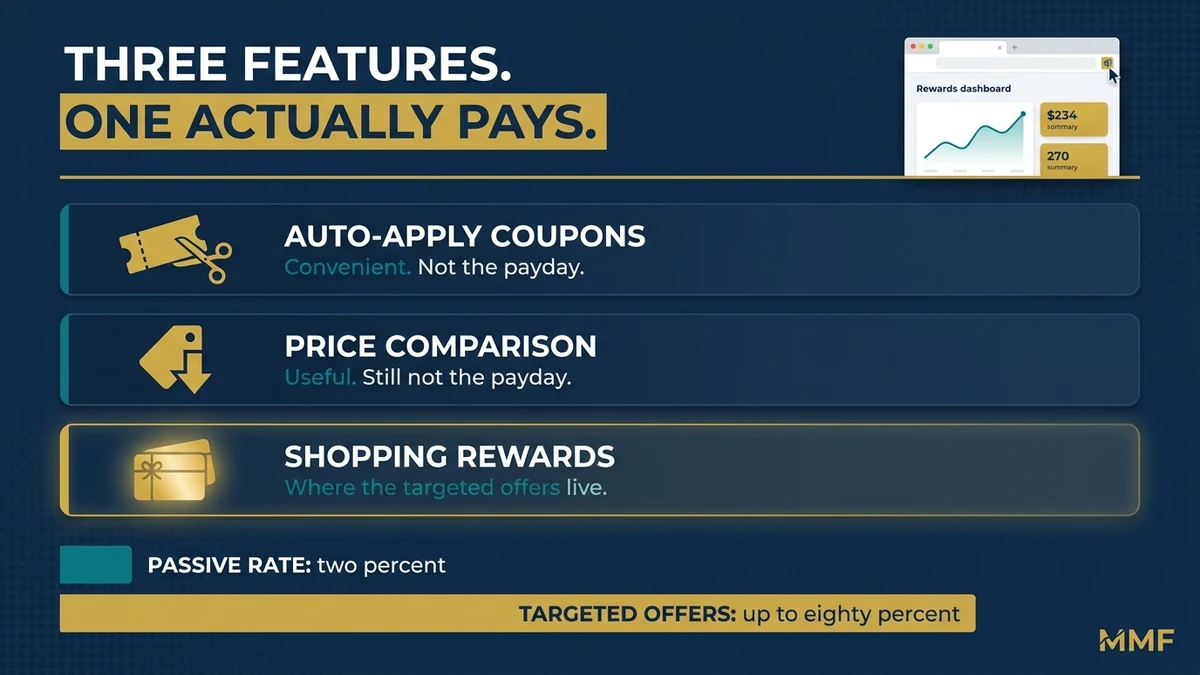
Capital One Shopping is a free browser extension and mobile app. The part that surprises people is that you don’t need a Capital One credit card or a Capital One bank account to use it. In fact, anyone can sign up.
It comes with 3 main features. First, it auto-applies coupon codes at checkout. Second, it compares prices across retailers and flags price drops. Admittedly those two are fine, and they’re what most people know it for. But the third one is Shopping Rewards, a cash-back-style program where eligible purchases earn rewards you redeem as gift cards. Inside that program sit the targeted “For You” offers, and that’s where the real gold is with this program.
One thing to clear up before we go further, because it trips people up constantly. Capital One Shopping is not the same product as Capital One Offers. Specifically, Offers is tied directly to your Capital One credit card, it earns miles or cash back, and it shows up in your card account. By comparison, Shopping is a standalone tool that works with any card, and the rewards come out as gift cards. If you’re newer to the Capital One ecosystem, I broke down a few of my favorite features in this Capital One vs Chase comparison.
It’s free to install either way. New users can also pick up $80 through my Capital One Shopping referral link for keeping the extension active 90 days, and I break the full terms down below.
Want free tools to run the numbers on your own card setup? I built a toolkit for exactly this.
Grab the free Rewards & Returns Toolkit
Why the Default Rates Aren’t the Reason to Install It
Admittedly, the base rates you earn just for shopping through Capital One Shopping are weak. You’re looking at roughly 0.5% to 2% at most stores.
By comparison, a flat 2% cash back card pays the same 2% at every store, in actual cash, with no portal to click through and no tracking to worry about. So if the default rate is your whole plan, you’re adding a step at checkout for a return you could get from a decent card anyway. On top of that, you’re taking it in gift cards instead of money. Even when you value the gift cards at face value the cash back is still just a penny a point. This makes the passive version of this tool a loss in general when compared to something like Rakuten.
What does keep this in my daily rotation however is that you can periodically get offers of 40% back or more on a purchase I was making anyway, and no card or Rakuten is doing that on a consistent basis.
The Targeted Offers Are the Whole Point
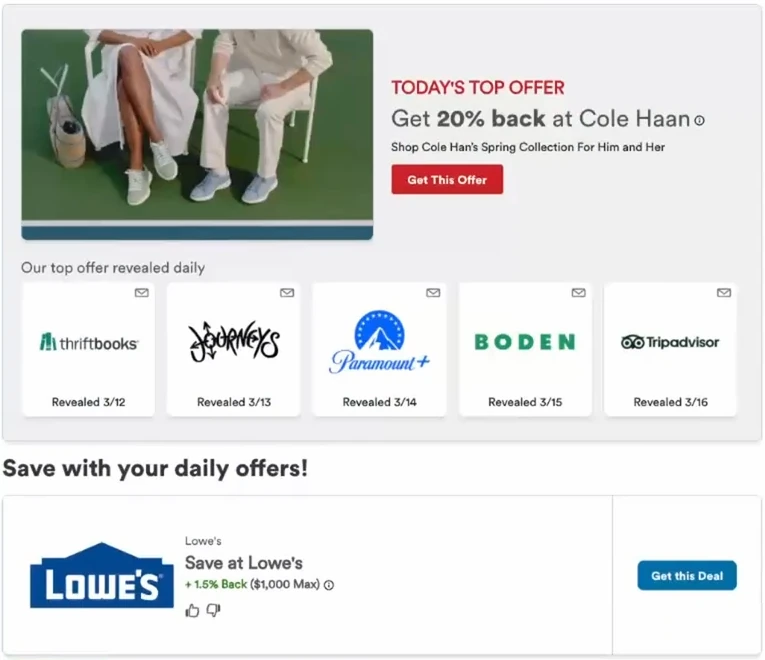
Targeted “For You” offers are personalized deals Capital One surfaces based on your browsing and purchase history. They can run 30% or more, and I’ve had them come in at 40%, 70%, and 80%.
Specifically, they show up in two places, and the second one is the one many people miss.
First, the home screen. When you open the extension or the app, scroll past the daily deals and there’s a “For You” section. Sometimes two separate offers for the same store sit there at different percentages, so you can take the better one.
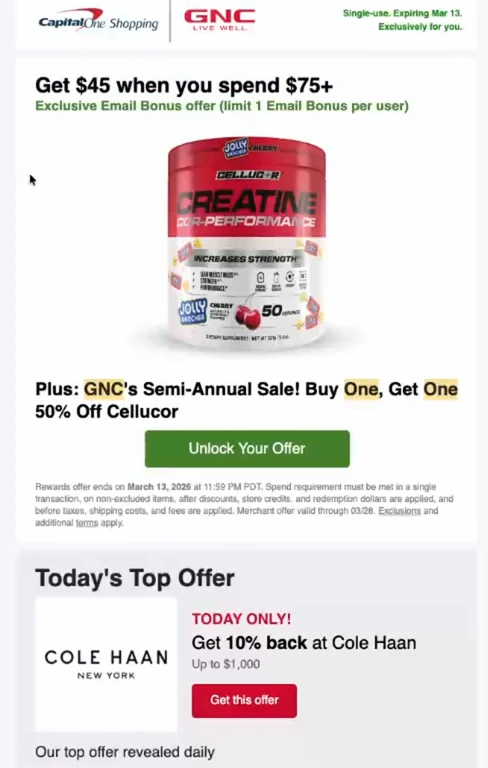
Second, your email. Capital One Shopping sends targeted offer emails straight to your inbox, and in my experience these are often higher than anything showing publicly on the home screen. Here’s the practical problem with those. Even there the best offers aren’t the subject. A lot of the time if you scroll down on the email you will get better ones. This is where I’ve found many of my best offers.
Still, one rule matters more than any of this. Once you click an offer to activate it, it disappears from your list. So don’t click until you’re at checkout ready to buy. Instead, browse normally and activate at the last second.
The Trigger Technique
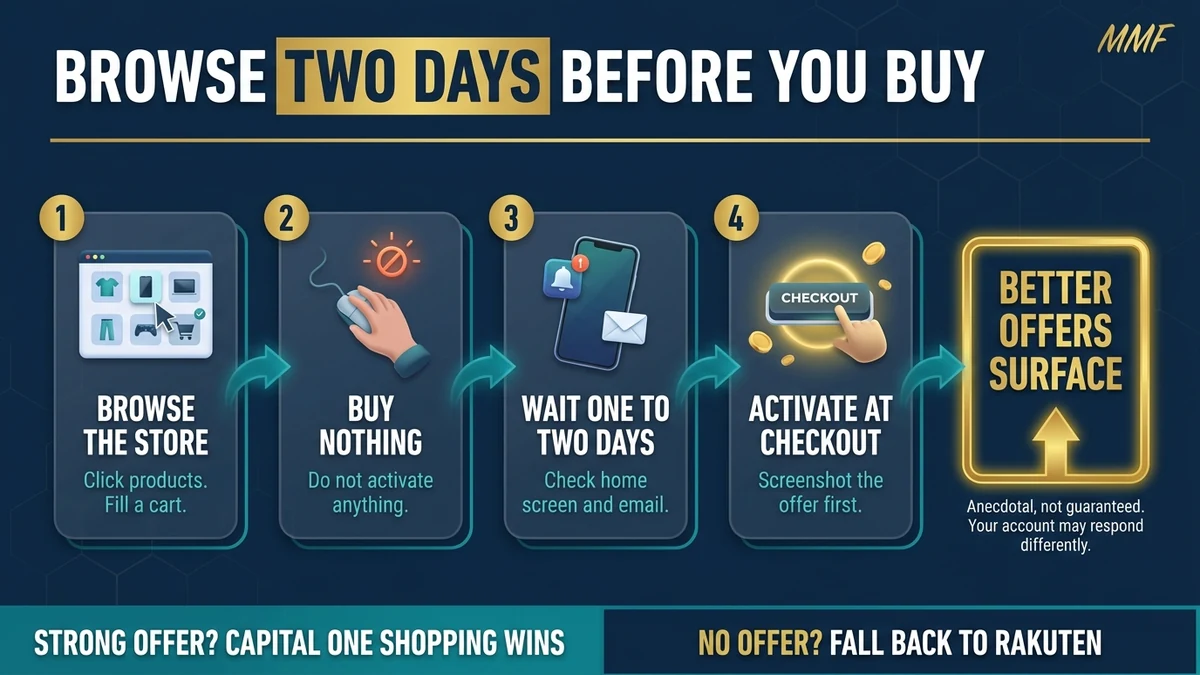
This is the piece that changed how I use the tool. Now like I mentioned above this is all my own experience. I can’t prove this is the case, I can only confirm it’s worked for me multiple times.
In practice, the technique is simple. One or two days before a planned purchase, open Capital One Shopping and browse the store. Click around product pages. Put things in your cart. But don’t buy anything and don’t activate anything. Just browse.
What appears to happen is that Capital One reads that activity as buying intent, then surfaces higher targeted offers either on your home screen or in your email. Truthfully, I can’t tell you that’s exactly what’s going on, because Capital One doesn’t publish how the targeting works. What I can tell you is that I ran it for three months, cleared $500 in rewards, and the community data points are similar.
So treat that as a pattern rather than a guarantee, because your account could respond differently.
Rakuten vs Capital One Shopping: How I Decide
I use both tools in my core online shopping strategy, but they have different jobs. Treating them as competitors is how people end up using the wrong one.
Where Rakuten fits
Overall, Rakuten is my everyday driver. If I’m buying something online and it isn’t Amazon, Rakuten is where I start. It pays in cash back, Amex Membership Rewards points, or Bilt points. For a stretch I was routing everything through it to build Bilt points while the transfer was still 1:1. That window has since closed for non-status Bilt Blue members, who now get 50 Bilt points per dollar of cash back instead of 100.
Still, I caught about 66,000 points before it closed and moved those over to Hyatt, which covered three nights on a trip. If you want a breakdown on one of my favorite Bilt cards, check out my Bilt credit card review. And if you’re running neither tool right now, Rakuten is the one I’d set up first since it covers everyday spend instead of one-off offers. New members currently get a $50 bonus through my Rakuten referral link.
By comparison, Capital One Shopping is opportunistic for me. I only use it when a strong targeted offer is live on something I was already buying.
The decision I run on every big purchase
Here’s the actual decision I run for most purchases over $50:
- Check the Capital One Shopping home screen and my email. Is there a strong offer for this store?
- If yes, Capital One Shopping wins this purchase.
- If no, check what Rakuten is paying on that merchant.
- Come back the next day and recheck, then make the purchase on the best offer.
- Either way, put it on a rewards card to stack both my card’s points and the shopping portal.
Overall, that’s the whole system. It takes about ten minutes on a big purchase. If you’re not sure which card belongs in step five, my best credit cards for big purchases playbook covers that side of it.
The Protection Checklist
Most people I work with find $300–$800/year in missed rewards from one wrong card or one misassigned category. I map your real spending and build a custom plan in a 30-minute call.
Not financial advice. Results vary by individual spend.
These are the rules I follow on every Capital One Shopping purchase to make sure I am putting myself in the best position to have the rewards post. Earning a 40% offer and then watching it fail is the worst outcome here, and it’s avoidable more often than not.
Screenshot before you activate
Get the timestamp, the percentage, and the merchant name in one shot. This is your evidence if the reward doesn’t post. If you get lazy and skip this you may not have a leg to stand on when disputing.
Stay in one browser on one device
From activation through order confirmation, stay put on one device. Don’t start on your laptop and finish on your phone.
Disable competing extensions
If Rakuten or Honey is hooked up on your same browser, turn it off first. Two portal extensions live in one session can create a tracking conflict where both try to claim credit and neither one hits. I have run both in the same browser and it’s worked, but there’s mixed reviews here. Having two separate browsers for each is the safer setup.
Don’t open new tabs after activating
Once you’ve activated, stay on the retailer’s site until the order is done.
Read the offer terms first
Check delivery method, eligible categories, and minimum spend. All of it matters, and this is probably the rule I’d pay the most attention to.
Submit a claim after 30 days
If the reward hasn’t posted, go to Help in the app or extension. Then find “Where are my Rewards?” and submit with your screenshots attached.
What Three Real Purchases Paid
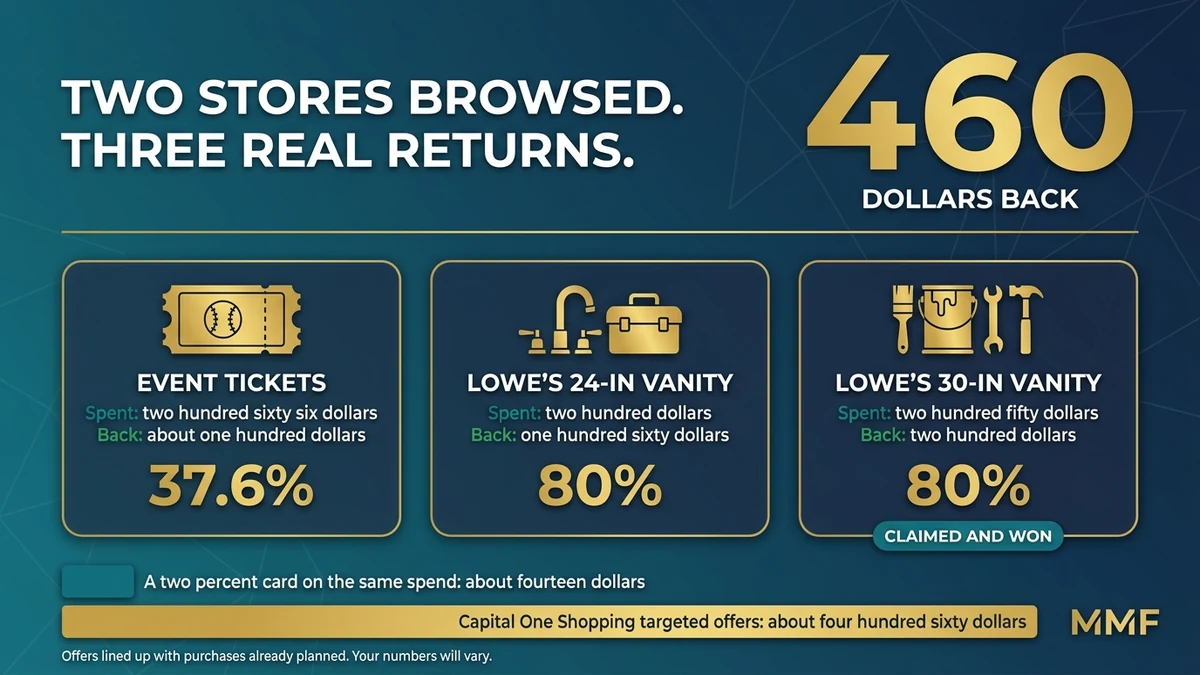
Here’s what this looks like with actual money on the table.
Spring training tickets, game one
Two tickets through an event ticketing site, $266 total. Capital One Shopping had an offer live for a merchant I was planning to use anyway and Rakuten wasn’t close, so this one was easy.
$266 spent, about $100 back in Shopping Rewards. That’s roughly 37.6% back on a purchase I was making regardless. By comparison, a 2% cash back card would have paid about $5.32 on the same spend.
Spring training tickets, game two
Same weekend, different game. When I checked this time there was nothing on the home screen and nothing in email, so I flipped to Rakuten and took 6% on $182, which came out to about $11. Not exciting, but it’s solid value for a $182 purchase.
The two Lowe’s offers

This is the trigger technique in action. Because I had bathroom work coming up, I browsed both Home Depot and Lowe’s across a couple of days without buying or activating anything. Then two offers appeared, and both of them came back Lowe’s: spend $250 get $200 back, and spend $200 get $160 back. Both were tied to the exact bathroom vanities I’d been looking at, and both cards said “You last viewed Feb 6” and “You last viewed Feb 2” right on them. That’s about as close to proof of the browse technique as you’re going to get from a company that won’t explain its targeting.
I took the $200 offer against a $200 plumbing and shower purchase. $200 out of pocket, $160 back in gift cards, an 80% return on that transaction. The second offer paid $200 back on $250 spent, which is also 80%.
Now here’s the part that nearly cooked me. On the Lowe’s order I checked out with shipping selected. But the next day Lowe’s called about a delivery window and a delivery fee, so I told them to cancel it and I’d pick it up in store. When the rep changed the order from delivery to in-store pickup, that altered the transaction after checkout. Specifically, that’s almost certainly why it didn’t track.
It went to a missing rewards claim and I won it, which happened because I had the screenshots from before I activated. Still, the lesson here is the one that keeps you out of the claims process entirely. Don’t modify an order after checkout if you want the reward to track.
What it all added up to
Overall, those three purchases account for about $460, which is most of the $500 I mentioned at the top.
If you’re not on Capital One Shopping yet, new users can currently get $80 for installing the extension through my referral and keeping it active for 90 days. You can read the full terms at Capital One Shopping’s website, but it’s a pretty straightforward process. Install it within 7 days of signing up, give it full permissions, and use it normally for the 90 days. The best part is you don’t even have to make a purchase to start. Here’s my referral link if you want to use it, and I appreciate it if you do since it helps out a lot.
Those returns assume offers that happened to line up with purchases I already had planned, and there’s no way to force a great offer to appear. Most people I work with are leaving somewhere between $300 and $800 a year on the table from category mismatches on cards they already carry, which is a more reliable place to start. If you want to work with me on your everyday credit card set up, that’s what the Spend Audit ($97) is for.
Where Capital One Shopping Falls Short
I’d rather you go in knowing the friction, because there’s a decent amount of it.
First, like I mentioned the rewards are gift cards. They don’t pay out as cash and they don’t go to PayPal. By comparison, Rakuten pays real money or points, and that’s a meaningful difference. If you can’t use a gift card from the available merchants, the reward is worth nothing to you, and something like the PayPal debit card is a better lane for actual cash on everyday spend.
Second, tracking can fail. You can follow every rule above and still lose a reward, because some retailers are reliable and some aren’t. There is no way to guarantee tracking on any single purchase.
Also, the pending window is long. Rewards sit in pending status for roughly 30 to 90 days depending on the merchant before you can redeem them. So this isn’t the tool if you need value quickly.
Then there’s Amazon, which isn’t a redemption option at all. That’s a real gap, given that Amazon is a lot of people’s largest online spend.
Finally, the targeting is a black box. You can’t make a great offer appear, and some accounts see better offers than others. Still, the browse technique seems to help without being a guarantee.
So is it still worth installing?
That’s a genuinely long list, so let me be clear about where I stand here. This is a supplementary tool and strategy rather than a foundation. The foundation is a card setup that matches your spending. Specifically, I’d point you at something like the Capital One Savor or a solid catch-all first. But don’t let the caveats talk you out of it. After all, one 80% offer on a $200 purchase returns $160, and one 40% offer on a $300 purchase returns $120. Those deals a few times a year will move the needle in a way no standard credit card is going to touch.
Best For / Not For
Best for:
- Anyone making large planned online purchases, call it $50 or more, who’ll check for an offer before buying
- People willing to actively monitor the home screen and their email rather than setting it and forgetting it
- Shoppers who can genuinely use gift cards from the available merchants
- Anyone already running Rakuten who wants a high-upside layer on top for the right purchases
Not for:
- Your everyday passive cash back strategy, which is Rakuten’s job
- Anyone who needs actual cash rather than gift cards
- People who won’t run the protection checklist, since the risk of a lost reward is real
- Anyone who needs rewards available quickly, given the pending window
- Anyone carrying credit card debt. Pay that off first before you worry about trying to get rewards on your purchases.
Capital One Shopping FAQs
Is Capital One Shopping worth it?
It depends on which layer you use. At the default 0.5% to 2%, it’s hard to justify over just using a 2% cash back card, especially since you’re paid in gift cards. However, if you’ll actively watch for targeted offers on planned purchases, the 30% to 80% offers can make it one of the higher-return tools in your setup.
Do you need a Capital One card to use Capital One Shopping?
No. It’s free, and it doesn’t require a Capital One credit card or bank account. Anyone can sign up and use it with any card.
Is Capital One Shopping legit?
Yes. It’s an actual Capital One product and the rewards do pay out. Still, the honest caveat isn’t legitimacy, it’s tracking, since individual purchases sometimes fail to post. That’s why screenshots before activating matter.
How do Capital One Shopping rewards work?
Eligible purchases earn rewards that sit in pending status for roughly 30 to 90 days depending on the merchant. Once available, you redeem them as e-gift cards, and codes typically arrive within about three business days. However, there’s no cash or PayPal option.
Capital One Shopping vs Rakuten: which is better?
They do different jobs, so I run both. Overall, Rakuten works better as a default because it pays in cash or transferable points at a predictable rate. By comparison, Capital One Shopping wins on any single purchase where a strong targeted offer is live. So check Capital One Shopping first on big purchases, then fall back to Rakuten when there’s no offer. If you’re starting from zero, set up Rakuten first for everyday spend, then add Capital One Shopping for the planned big ones.
Can you get Amazon gift cards from Capital One Shopping?
No. Amazon isn’t a redemption option. Specifically, the catalog covers merchants like Best Buy, Home Depot, Lowe’s, DoorDash and Starbucks among others. So check whether you’d actually use those before counting on the rewards.
Capital One Shopping’s default rate is weak enough that I’d skip it if that were the whole product. Now the targeted offer layer is a different story, and it paid me about $460 across three purchases I was making anyway. So install it, ignore the passive rates, and check it before every planned purchase over $50. Screenshot the offer before you activate, don’t touch the order after checkout, and treat anything it pays as a bonus on top of a card setup that already works. For more on the setup underneath it, the four-card breakdown is where I’d start.
And if this pushed you to try it, my referral link gets you the $80. Appreciate it if you use it.
If you try the browse technique, tell me what store you used and what showed up. I want the data points.

Capital One Savor Rewards
3% dining, entertainment, grocery, streaming. 8% via C1 Entertainment. No annual fee.
$0/yr
Bilt Blue
Earns points on rent with no annual fee. 1x everyday or 4% Bilt Cash (flexible). Up to 1.25x on housing.
$0/yrTerms apply. Some links are affiliate links. I only recommend products I personally use or genuinely believe will help you. Pay your balance in full.
Some links are affiliate links. I only recommend products I personally use or genuinely believe will help you. Quick heads up: the Capital One Shopping and Rakuten links are referral links, so we both get a bonus if you sign up through them, at no cost to you. Capital One Shopping rewards are subject to offer terms and merchant tracking, so your results will vary. Referral bonuses may be considered taxable income and Capital One may issue a 1099-MISC. Terms apply. Pay your balance in full. Applying for a credit card results in a hard inquiry. I’m not a financial advisor or CPA. This is personal experience and opinion.
Join the discussion
Prompt
What's your experience with this card or strategy? Share your numbers.
Be the first to share your numbers
Real datapoints from the comments make this thread more useful than another review post.
Leave a comment